Contents | Index | Next
Company Settings
This function may be accessed only through the Auxiliaries menu. It mirrors
the most vital functions of System Control in BART Scheduling-4-Windows.
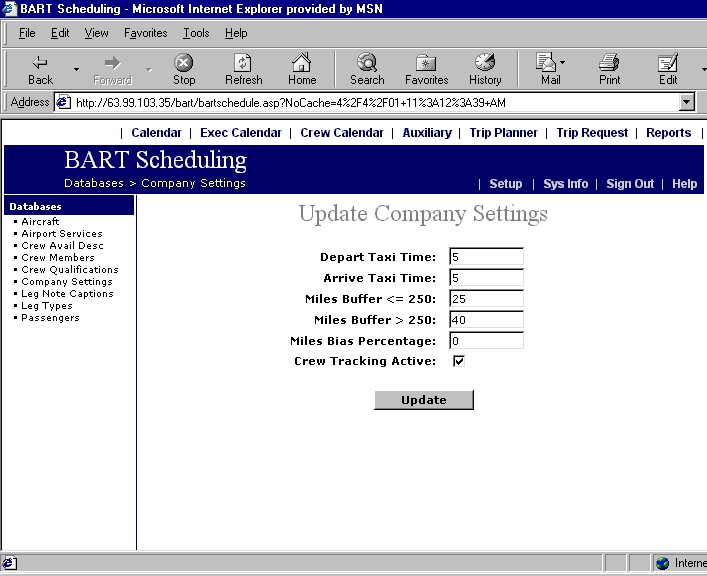 Field Explanations
Default Departure and Arrival Taxi Times: Expressed in minutes, these values will be added to the calculated flight time
to produce the block time for scheduled flights. These values apply only if a
default value has not been entered into the Airport Directory for the airport
concerned.
Mileage Added to Trips Less than 250 Nautical Miles: The Scheduling program automatically calculates a Great Circle (straight-line)
distance between each departure point and destination. Since airplanes rarely
fly in a straight line, you have the option of entering additional mileage to
be added to trips to account for the difference in Great Circle calculations and
departure/approach vectors and airways flying. There are two methods of adding
mileage to the Great Circle Distance. See Bias Factor below for an alternative
method.
NOTE: The added mileage is not included on trips when a helicopter is scheduled.
Mileage Added to Trips More than 250 Nautical Miles: The BART-4-Web program automatically calculates a Great Circle (straight-line)
distance between each departure point and destination. Since airplanes rarely
fly in a straight line, you have the option of entering additional mileage to
be added to trips to account for the difference in Great Circle calculations and
departure/approach vectors and airways flying. There are two methods of adding
mileage to the Great Circle Distance. See Bias Factor below for an alternative
method.
NOTE: The added mileage is not included on trips when a helicopter is scheduled.
Bias Factor: This feature offers an optional method of adding mileage to the calculated
Great Circle distance between airports. Great Circle distance may be biased by any
percentage. A typical bias percentage entered here might be 5%.
CAUTION: The bias factor will override any mileage to be added entries.
Activate Crew Tracking: Activating this function instructs BART-4-Web to check the Crew Tracking
module to determine the availability and qualifications of crewmembers when a schedule is being prepared. This function may be
accessed only through Auxiliaries/Company Settings. If this box is checked, the
program will only allow qualified crewmembers to be assigned to a flight. This
feature prevents many scheduling conflicts and problems.
Field Explanations
Default Departure and Arrival Taxi Times: Expressed in minutes, these values will be added to the calculated flight time
to produce the block time for scheduled flights. These values apply only if a
default value has not been entered into the Airport Directory for the airport
concerned.
Mileage Added to Trips Less than 250 Nautical Miles: The Scheduling program automatically calculates a Great Circle (straight-line)
distance between each departure point and destination. Since airplanes rarely
fly in a straight line, you have the option of entering additional mileage to
be added to trips to account for the difference in Great Circle calculations and
departure/approach vectors and airways flying. There are two methods of adding
mileage to the Great Circle Distance. See Bias Factor below for an alternative
method.
NOTE: The added mileage is not included on trips when a helicopter is scheduled.
Mileage Added to Trips More than 250 Nautical Miles: The BART-4-Web program automatically calculates a Great Circle (straight-line)
distance between each departure point and destination. Since airplanes rarely
fly in a straight line, you have the option of entering additional mileage to
be added to trips to account for the difference in Great Circle calculations and
departure/approach vectors and airways flying. There are two methods of adding
mileage to the Great Circle Distance. See Bias Factor below for an alternative
method.
NOTE: The added mileage is not included on trips when a helicopter is scheduled.
Bias Factor: This feature offers an optional method of adding mileage to the calculated
Great Circle distance between airports. Great Circle distance may be biased by any
percentage. A typical bias percentage entered here might be 5%.
CAUTION: The bias factor will override any mileage to be added entries.
Activate Crew Tracking: Activating this function instructs BART-4-Web to check the Crew Tracking
module to determine the availability and qualifications of crewmembers when a schedule is being prepared. This function may be
accessed only through Auxiliaries/Company Settings. If this box is checked, the
program will only allow qualified crewmembers to be assigned to a flight. This
feature prevents many scheduling conflicts and problems.